
DAHUA DHI-DSSPro8-Entrance-License

Key features of DSS Professional V8 software
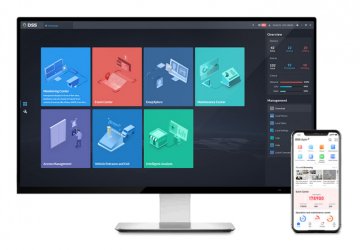
- New look for easier use
- Jauns interfeiss nodrošina ērtāku operētājsistēmu
- Vienkārši palielināt veiktspēju, izmantojot izkliedētus aparatūras paplašinājumus
- Vienkārši atjaunināt funkcionalitāti, izmantojot papildinājumus
- Atbalsts galvenajam serverim karstā gaidstāves režīmā Plaša saderība
- Dahua Technology ierīces, tostarp: IP kameras (stacionāras un rotējošas), NVRNVR un citas ierīces, ITCmuni,li ONVIF protokols
- Possibility to provide DSS Pro SDK for external platform or mobile application development
Augsta stabilitāte un elastība darbībā
One DHI-DSSPro8-Entrance-License sistēmai, kas ļauj pievienot vienu VSS profesionālu sistēmu. ieeja/izeja.
Piezīmes! Šim produktam ir nepieciešama DHI-DSSPro8-16Video-Base licence (ja ITC kameru skaits ir lielāks par 16, ir jāiegādājas licence papildu video kanālam).
Papildus drošības lietojumprogrammām DSS Professional nodrošina risinājumus dažādām nozarēm, piemēram, parkiem, mazumtirdzniecības ķēdēm, bankām, naftai un gāzei, loģistikai un daudzām citām nozarēm.
Apraksta kanāliem. ACS
DSS system assumptions DSS platforma var īstenot dažādus video integrācijas, piekļuves kontroles vai AI funkciju scenārijus. Sistēma piedāvā galalietotājam visaptverošu risinājumu un racionalizē ikdienas darbu. Mērogojamība DSS ir ļoti mērogojama atalgojuma programmatūra, kas atbilst mūsu klientu augošajām prasībām. Tā piedāvā kanālu licencēšanu, kā arī iespēju paplašināt ar papildu moduļiem. Security The DSS platform was developed by a dedicated and professional R&D team under the principle of “Security by Design, Development and Verification”. It complies with various international standards for application security, data security, network security and privacy security. Openness We are constantly striving to collaborate with external partners to provide users with more and more options and services. Tajā pašā laikā DSS kā uz klientu orientēta sistēma nodrošina pielāgošanu visos līmeņos, lai izpildītu dažādas ieviešanas fāzes un sarežģītās prasības.
row”>
Working environment:
Operating systems:
- Serverim: – Windows 7 Ultimate (64 bitu) / Windows 10 Enterprise / Windows Server 2008 R2 Standard
Windows Server 2008 R2 Standartam
/ 8 – datoram
SS mobilais klients: – iOS: iOS 8.0 vai jaunāka versija – Android: Android 4.0 vai jaunāka versija
Hardware configuration:
Recommended for server:
- 16 GB RAM
- 1 TB sistēmas disks, 500 GB rezervēts DSS.
- 4 portu Ethernet ports @ 1000 Mb/s
- E3-1220 v5 procesors @ 2,60 TB procesors >
- li GHz orli>li sistēmas disks, 500 GB rezervēts DSS
- 2 portu Ethernet ports @ 1000 Mb/s
process: GH @2core:
- . procesors
Minimum server:
Klienta personālajam datoram ieteicams:
- 8 kodolu process, li 4 GB RAM, vai Intel Core i >
- Karte NVIDIA® GeForce® GT 730 grafiskā karte
- Sistēmas disks 200 GB rezervēts DSS klientam
- Ethernet ports 1000 Mb/s
Personālajam klientam:
- Intel Core i3 procesors, 64 bitu karte ><0 Grafs® 4 kodolu grafiskais procesors
- Sistēmas disks 100 GB rezervēts DSS klientam
- Ethernet ports 1000 Mb/s
>
Key features:
=”
Organizācijas vadība
• Izmantojot organizāciju,lai sasniegtu ierīču grupu pārvaldību
Device management
• Iespēja inicializēt Dahua Technology ierīces
• Pievienot ierīces, izmantojot automātisko meklēšanu, IP adresi, domēnu, IP segmentu, automātisku reģistrāciju (3G, 4G, DHCP)
• Dahua Technology ierīču, piemēram, IP kameru (fiksētās un PTZ) pārvaldība, izmantojot OVRN, u.c. atbalstu.•p protokols
• Iespēja mainīt Dahua Technology ierīču IP adreses
• Iespēja mainīt pievienoto ierīču paroli
Atļauju un lietotāju pārvaldība
• Pievienot, rediģēt un dzēst lomas un lietotājus
• Piešķirt dažādas lomas ar dažādām atļaujām
• > Iespēja piešķirt lietotājam atbilstošu lomu, izmantojot AC atļauju
adrese, lai iegūtu atbilstošu termiņu
>
• Iespēja iestatīt PTZ atļaujas
• Lietotāju var bloķēt
• Domēna lietotāju var importēt un piešķirt lomu.
Notikumu pārvaldība
• Ierīces izņēmumu noteikšana, video notikumi, trauksmes ievades un trauksmes saimnieki
• Signalizācijas grafiks: visa diena, nedēļa, nedēļas nogale, pielāgots
• Signalizācijas prioritātes: zems, vidējs, vienmērīgs ieraksts, video vadība, PT atbilde
, e-pasts
• Pievienojiet, rediģējiet, dzēsiet, iespējojiet un atspējojiet trauksmes grafikus
Datu krātuve
• Central storage: expand data space using iSCSI
• Pievienojiet, rediģējiet, dzēsiet, iespējojiet un atspējojiet ierakstīšanas grafiku
• Iekļaujiet centrālo krātuvi gala ierīcē un ierakstīšanas grafiku
• Ierakstu dublēšanas grafiks no gala ierīces, piemēram, EVS, NVR, DVR utt.
• Backup recordings from MDVR via WiFi
• Disk assignment: ability to group disks and assign cameras to different disk groups
Map
• Tiešsaistes un bezsaistes Google karšu atbalsts, rastra kartes izveide
• Galvenā karte
• Possibility
>
• Karšu un zemāka līmeņa karšu pievienošana, rediģēšana un dzēšana
• Ierīču (kameru,
Video wall
• Add and manage a video wall.
• Screen ID can be turned on/off
• Support screen linking on one screen
• Decoded channel and screen linking function
Resource linking
• IVS-F (Intelligent Video Management Server for Face Recognition Camera) with specified POS
POS
• Facial recognition library management
• Adding facial features and entering personal information
Vehicle blacklist
• Vehicle blacklist management
• Updating and editing vehicle blacklist System maintenance
Statistics
• General and detailed system information
• Operational data, C: PU. bandwidth
• Online information about services, devices and users, device status overview
• Statistical information about events: total number of events, number of events processed
• Source information: video channels, alarm channels
Magazines
• System logs, web manager, computer >< customer management
• Automatic data search and export
, once a week, once a month)
• Manually backing up system data
• Restoring system data from a server or local copy
Other features
• https support
• Device and server time calibration
Live view
• POS transaction overlay on image
• POS transaction overlay style configuration
• Map view in live view window
• Panorama smart tracking in modes: fixed + PTZ, 2 x fixed + PTZ
Playback, recording, central storage devices, filter from p. video loss,
• Synchronous playback
• Reverse playback
• Fast and slow forward playback
• Frame playback
• Lock or mark important records in central storage
• Download specific tracks, supported formats: AVI and DAV
• Decode the video to the video wall.
Download Center by time, file, or tag
• Support multi-task downloading
• Support DAV and AVI formats
Events
• Display alarm event information, including:
alarm time, alarm name, alarm status, etc.
• Show live image or snapshots from assigned Cameras
• Alarm event confirmation
• Alarm event activation control
• Forwarding the alarm to the appropriate user
• Sending alarm emails
• Alarm event handling
• Alarm event search
Video wall
• Real-time video recording
• Real-time video decoding to video wall decoding to video wall
• Video wall split configuration
• Changing the video channel stream type
• Adding a field, turning on/off the screen, and displaying the background
• Video channel switching
• Schedule: can organize tasks performed on a timeline
• Switch tasks and set a time loop. loop
• Support NKB keyboards to control the video wall.
Map
• Preview and playback on the map
• Zoom in and out
• Quickly decode video to video wall
• Calculate area or distance on a GIS map
• Support visible range and starting angle when channeling
• Using a fisheye camera or dome camera
Census
• People counting and heat map
• Entry and exit count statistics data
• Search for people by counting data by time
• Generate daily, weekly, monthly report
• Heatmap search
• People counting and heat map data Export
facial recognition
• Automatic face detection in the camera's field of view
• Real-time face detection and recognition information Demonstration
• Need to quickly register unknown/new > • Manual entries
• Trail Search: Generate a trail based on an artificial display of captured faces
anpr
• Real-time vehicle traffic records and license plate recognition
• Search historical license plate. Manual entries
Violations
• Search for information about vehicle violations
• Play the video of the violation
Intelligent radar tracking
• Radar and dome camera link
• When the radar detects an object, the camera rotates to the specified position
Custom business, sales, order, rate record, top 10 list
• Number of people: number of people entering, entry level, area customer
• Transaction statistics: product price, sales growth, sales volume, orders
• Sales statistics: sales volume, sales over the years
• Order statistics: orders, orders year over year
route generation based on license plate numbers and time information
• Manual recordings
Violations
• Search for information about vehicle violations
• Playing the violation recording
Intelligent radar tracking
• Connecting radar and dome camera
• When the radar is rotated, the position of the object
•
• Summary: orders, sales, visits, custom deals, KPIs, rate record, top 10 list
• People counting: number of people entering, entry level, area customer
• Transaction statistics: product price, sales growth, sales volumes, orders
• Sales statistics: sales volumes, sales statistics for the year
orders per year
> orders
>
route generation based on license plate numbers and time information
• Manual recordings
Violations
• Search for information about vehicle violations
• Playing the violation recording
Intelligent radar tracking
• Connecting radar and dome camera
• When the radar is rotated, the position of the object
•
• Summary: orders, sales, visits, custom deals, KPIs, rate record, top 10 list
• People counting: number of people entering, entry level, area customer
• Transaction statistics: product price, sales growth, sales volumes, orders
• Sales statistics: sales volumes, sales statistics for the year
orders per year
> orders
>