


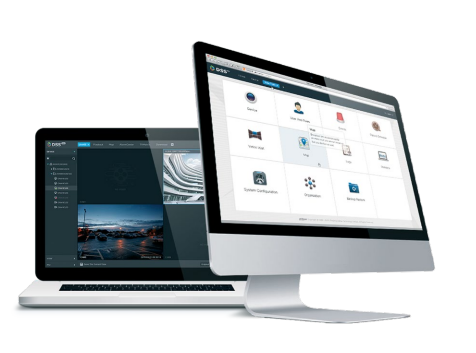
DAHUA DSSPro-Base-16Video-License

Features
- New look for easier use
- Based on Windows ><
- provides
- Easy functionality upgrades using add-ons
- Hot standby support for the main server Broad compatibility
- Dahua Technology devices, including: IP cameras (fixed and PTZ), NVR, DVR, MNVR, ITC devices and others
- logging devices that use third-party connectivity to provide DSS Pro SDK for external platform or mobile application development
newly designed stability interface and more flexible performance enhancements using common hardware extensions
DHI-DSSPro8-16Video Base License
Basic Video Surveillance V8 License in DSS. Includes a 16-channel video support package and is required to expand surveillance with additional video channels.
Description:
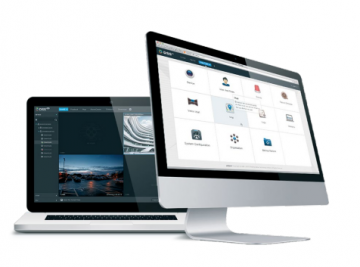
DSS Pro is a powerful, flexible, scalable and highly reliable central management system. Thanks to the client-server architecture that enables integration with multiple surveillance systems, DSS Pro provides central management, information exchange, convenient connections and multi-service collaboration. Allows you to manage devices, alarms and user permissions. It provides central data storage functions, support for video walls, maps and advanced features such as people counting, business analytics, facial recognition, smart tracking using radar or fisheye camera images, ANPR.
Operating environment: – iOS: iOS 8.0 or later — Android: Android 4.0 or later
Hardware configuration
Recommended for server:
- Processor E5-2640 v3 @ 2.60 GHz, 8-core processor ><0 TB SD disks,
- Ethernet port 4 ports @ 1000 Mb/s
memory disk
Minimum server:
- Processor E3-1220 v5 @ 2.60 GHz @ 4-core processor
- RAM 8 GB
- System disk 1 TB li
- System disk
@ 1000 Mbps
It is recommended for a personal client:
- Intel Core i5 processor, 64-bit, 4-core processor
- 8GB RAM
- NVIDIA® GeForce®GT 730 > Ethernet port0
GB slot 1 for graphics card
GB> disk 20 Mb/s
Minimum
- Intel Core i3, 64-bit processor, 4-core processor
- RAM 4 GB
- Graphics card Intel® HD Graphics 4400
- Reserving 100 GB of system disk for DSS client
- Ethernet port 1000 Mbps
DSS Pro Web Manager - Enterprise Configuration
Organizational management
• Using organization to achieve device group management
Device management
Device management
• Adding devices using the original address IP, domain, IP segment, automatic registration (3G, 4G, DHCP)
• Management of Dahua Technology devices, such as IP cameras (fixed and rotating), NVR recorders, DVRs, MNVRs, etc.
• Support for third-party devices that use the ONVIF protocol
• Ability to change the IP address of devices
• Added
changing the IP address of devices b>Managing permissions and users
• Add, edit, and delete roles and users
• Assigning different roles with different permissions
• Ability to assign a role to a user to obtain appropriate permissions
• User can be restricted by MAC address and user authorization expiration date.
• User permission expiration date to be blocked
• Ability to import a domain user and assign them a role
Management Events
• Detection of device exceptions, video events, alarm inputs and alarm hosts
• Alarm schedule: all day, week, weekend, custom
• Alarm priorities: low, medium, high
• Event response: recording, snapshot, live view, alarm output, PTZ control, schedule, delete, >
• add
>Data storage
• Central storage: expand data space using iSCSI
• Add, edit, delete, turn recording schedules on and off
• Considering central storage on the end device and recording schedule
• Backup schedule for recordings from end devices such as EVS, NVR, DVR, etc.
• Backup recordings from MDVR via WiFi
• Disk assignment: ability to group disks and assign cameras to different disk groups
creating a raster map
• Main map and lower level maps
• Ability to insert cards up to 8 levels
• Add, edit, and delete maps and sub-maps
• Adding, editing and deleting devices (cameras, alarm inputs) on the map • Ability to enable/disable Screen p>• Linking the POS channel to the corresponding cameras
Object management
• Facial recognition library management
• Adding face templates and entering personal information
Vehicle blacklist
• Vehicle blacklist management
• Vehicle blacklist management
• Updating and systematization >
• General and detailed information about the system
• Operational status: processor, data memory, bandwidth
• Online information about services, devices and users, device status overview
• Statistical information about events: total number of events, number of events processed
• Source information: video channels, alarm channels
Magazines
>System backup and recovery
• Automatic system data backup (daily, weekly, monthly)
• Manually backing up system data
• Restoring system data from a server or local copy
Other features
• https support
• Device and server time calibration
C b>Live view
• POS transaction overlay on image
• POS transaction overlay style configuration
• Map view in live view window
• Panorama smart tracking in modes: camera
fixed + dome camera, 2 x fixed camera
+ dome camera, playback
p>
Video filtering: normal, motion, alarm, video loss, sabotage
• Synchronous playback
• Reverse playback
• Fast and slow forward playback
• Frame-by-frame playback
• Lock or mark an important entry in the central
video storage.
video storage >
Download Center
• Downloading records from central storage or end devices
• Download recordings by time, file or tag
• Support multi-task downloading
• Support DAV and AVI
Events
• Display of alarm event information, including:
alarm time, alarm name, alarm status, etc.
• Show live or snapshots from assigned camera
• Alarm event confirmation
• Alarm activation control
• For alarm event transmission
••P> Alarm event handling
• Alarm event search
Video wall
• Real-time video decoding in video wall
• Decoding playback recordings in a video wall
• Automatic/manual decoding in video wall
• Configuring video wall splitting
• Changing the channel type
• videos
• Adding fields,
Screen on/off and background display
• Video channel switching
• Schedule: can organize tasks on a timeline
• Switching plan: can perform loop tasks and set the loop time.
• Support NKB keyboards to control the video wall.
Map
• Quickly zoom and play Add a video to a video wall
• Calculating area or distance on a GIS map
• Supports visible range and starting angle
• Channel flashing in case of alarm
Intelligent tracking
• Using a fisheye camera or dome camera
Census and map
Heat
• Entry and exit counting statistics
• Search for people by counting data by time
• Generate daily, weekly, monthly reports
• Heatmap search
• Export census and heat map data.
Face recognition
• Automatic face recognition and capture time display
• P> >
• Fast registration of unknown/new faces in the database
• Similar face search
• Text search
• Manual recordings
• Trail search: generate tracks based on artificial
displaying captured faces
ANPR
• Vehicle traffic records and license plate recognition records.
Real-time license plate recognition results
• Search historical vehicle routes
• Route search: route generation based on license plate numbers and weather information
• Manual recordings
Violations
• Search for vehicle violations
• Play PT violation recording
p>
• When the radar detects an object, the camera rotates to the specified position.
Business analysis
• Summary: orders, sales, visits, custom deals, KPIs, rate input, Top 10 list
• Number of people: number of people entering, entry level, customer
area
• Transaction statistics: product price, sales growth, sales volume,
orders
• Sales statistics: sales volume, sales year-on-year
• Order statistics: orders, orders
years
Additional information
| Svars | 0,1000 kg |
|---|
Related Products

CAMERA ACC POLE MOUNT BRACKET/PFA152-E DAHUA

MX-225 PoE splitter for active microphones